
Runs & Logs
Inspect every automation execution: statuses, step-by-step output, variables, emails, and errors.
Every run—schedule, **Run Now**, or triggers you use—shows up here. Expand a row for per-step output, variables, and emails sent.
Read more
What a completed run looks like
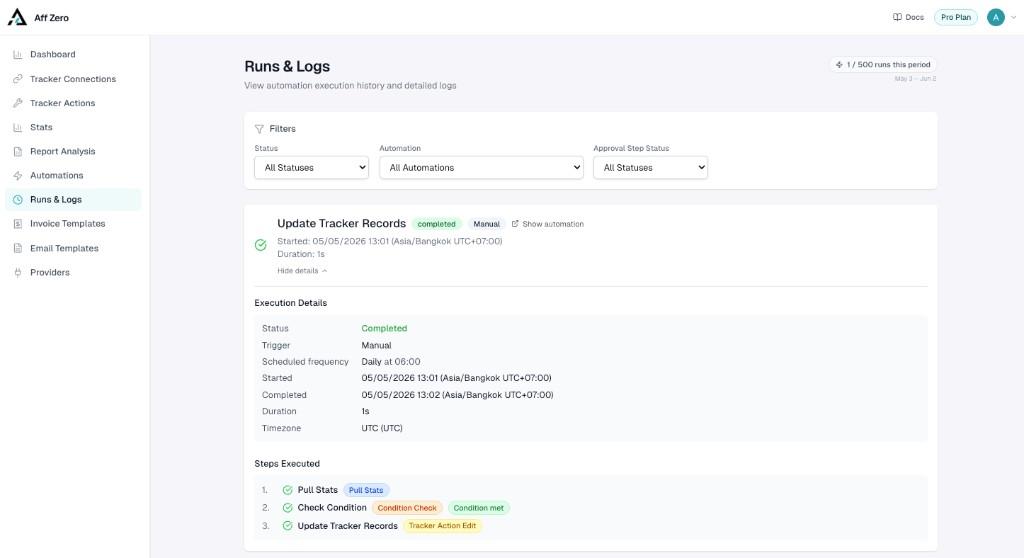
Statuses typically include Completed, Failed, Stopped by Condition, Pending Approval, or Running. Stopped by Condition is expected when a Check Condition gate fails—it is not classified as an error. Expand the run to inspect each step badge, timestamps, variable snapshots, and email deliveries. The screenshot below shows a manual Run Now of the Update Tracker Records preset after Pull Stats, Condition Check, and Tracker Action Edit all succeed—the same capture also appears at the end of Creating Your First Automation.
When something fails, start with the failing step’s log message, validate the related connection on the Stats page, and confirm variables referenced later in the flow still exist after filters or condition stops. Ready to build the workflow that produced this log? Work through Creating Your First Automation.
Read more